


Plank With Alternating Toe-Touch 101 Video Tutorial
0

Exercise Synopsis
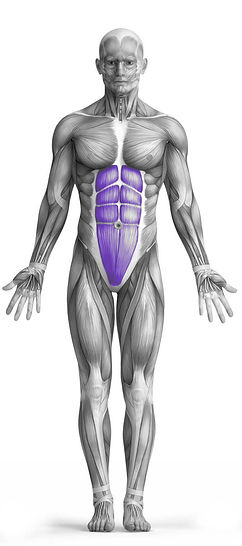
Target Muscle Group
Abs
Secondary Targets
Execution
Compound
Force Type
Core
Required Equipment
Bodyweight
Fitness Level
Intermediate
Variations
None
Alternatives
None
Timer
Hour
Minute
Second
Stopwatch
00:00:00:00
Overview
Plank With Alternating Toe-Touch is a bodyweight exercise that primarily targets the abs while engaging the obliques as a secondary muscle group. Starting in a standard plank position, you lift one hand to touch the opposite foot, alternating sides in a controlled manner. This movement challenges core stability, balance, and coordination, while also activating the shoulders, glutes, and hip stabilizers. It is an effective exercise for strengthening the entire core, improving posture, and enhancing overall body control.
How to Perform
Start in a high plank position with your hands directly under your shoulders, arms straight, and feet hip-width apart.
Engage your core by drawing your belly button toward your spine and keeping your back flat.
Lift your right hand off the ground and reach toward your left foot, keeping your body as stable as possible.
Return your right hand to the plank position while maintaining a strong, stable core.
Lift your left hand off the ground and reach toward your right foot, alternating sides in a controlled motion.
Keep your hips level and avoid twisting or sagging your lower back during the movement.
Continue alternating sides for the desired number of repetitions, maintaining proper form throughout.
★ Bonus: For exercises that involve external weights (such as dumbbells, barbells, or machines), the One Rep Max (1RM) calculator can help you estimate your maximum lifting capacity. Use it to track your strength progress and adjust your training for optimal results.
Tips
Keep your core tight throughout the exercise to protect your lower back.
Move slowly and controlled to maximize core engagement.
Maintain hips level and avoid rotating your pelvis excessively.
Focus on reaching your hand to the opposite foot without compromising plank form.
Breathe steadily; exhale as you reach, inhale as you return.
Keep shoulders stacked over wrists to prevent strain.
Engage glutes and thighs to enhance overall stability.
Avoid letting your lower back sag or your hips rise.
Start with smaller reaches if full reach compromises form.
Use a mirror or record yourself to monitor proper alignment.
How Not to Perform
Do not let your hips sag or drop toward the floor.
Do not rotate your torso excessively when reaching for your foot.
Do not lock your elbows; keep a slight bend to protect your joints.
Do not lift your hips too high, which reduces core engagement.
Do not rush the movement; avoid using momentum instead of controlled motion.
Do not let your shoulders collapse or shrug toward your ears.
Do not hold your breath; maintain steady breathing throughout.
Do not reach beyond your flexibility limit, which can strain muscles.
Do not allow your neck to crane; keep it neutral with your spine.
Do not let your lower back arch excessively during the reach.
Variations
Variations of fitness exercises refer to different ways of performing a specific exercise or movement to target various muscle groups, intensities, or goals. These variations aim to challenge the body differently, prevent plateaus, and cater to individuals with varying fitness levels.
Alternatives
Alternative exercises in fitness refer to different movements or activities that target similar muscle groups or serve the same training purpose as the primary exercise. These alternative exercises can be used as substitutes when the original exercise is unavailable or challenging to perform due to various reasons such as equipment limitations, injuries, or personal preferences.
